|
Data Encryption in Active Server Pages
by Daniel Maddox, Jr.
Introduction
There are many scenarios where implementing data encryption
is necessary to safeguard data gathered via Active Server Pages (ASP). Whether
you need to encrypt a password or an entire customer order, this article
can help you quickly add data encryption to your ASP.
What You Need
To run the example in this article and add encryption to your own ASP, you
will need the following:
- Encryption Toolkit. The Nickellie Encryption Toolkit consists of COM components
that make it easier to add data encryption and file encryption to your applications.
Nickellie offers a free trial of the toolkit.
- NCryptoWrapper. The
NCryptoWrapper class is a simple wrapper class that extends the Nickellie Encryption Toolkit
to provide support for ASP and data types needed in ASP. The NCryptoWrapper and its source
code are available as a free add on to the Nickellie Encryption Toolkit.
- Example Code. The example discussed in this article illustrates
data encryption in a simple ASP page.
Detailed installation instructions and download links can be found a the end of this
article.
The Example
To illustrate the use of data encryption from ASP, this article includes a sample
ASP page that encrypts or decrypts data string.
The ASP example uses the NCryptoWrapper class to encrypt or decrypt
a string entered by the user. The encrypted string is converted to
a "safe" string, i.e. a string that consists of only alpha-numeric
characters. I refer to it as a "safe" string because it can be be
inserted into a database, record set, SQL
statement, or XML file without producing an error.
Let’s take a look at the example. The example
allows you to enter data to encrypt or decrypt in the
Source field, select Encrypt or Decrypt, click Submit, and
display the results in the Destination field.
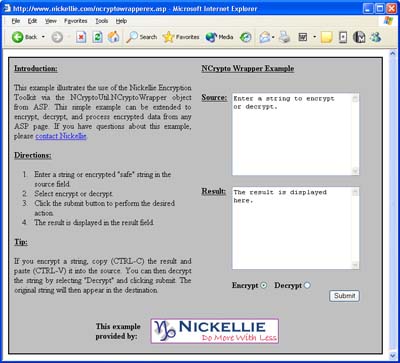
The ASP page uses EncryptStringSafe and DecryptStringSafe.
The page posts to itself, and the code to encrypt and decrypt the data can be seen
in Listing 1. It would be fairly easy to extend this example
to write the encrypted data into database or pass it to another object for further
processing.
'data was posted to encrypt or decrypt
sourcedata = Request.Form.Item("source")
'Create an NCryptoWrapper Object
Set obj = Server.CreateObject("NCryptoUtil.NCryptoWrapper")
If Request.Form.Item("action") = "Decrypt" Then
'user selected decrypt, call DecryptStringSafe
resultdata = obj.DecryptStringSafe(sourcedata, "password")
Else
'user selected encrypt, call EncryptStringSafe
resultdata = obj.EncryptStringSafe(sourcedata, "password")
End If
| | Listing 1 |
Conclusion
As you can see, the NCryptoWrapper class provides a simple but
powerful interface for adding encryption capabilities to your ASP applications.
The source code for ASP page and the wrapper class is included in the download
of the project so you can adapt the example as needed for your own applications.
Additional Resources
Installation Notes
To install the examples discussed in the article, follow these steps:
- Download and install the Nickellie Encryption Toolkit (any Windows version).
Learn more. Download Trial.
- Download the source code for this article which includes source code for
the NCryptoWrapper class, the ASP example discussed in this article, and another VB example.
Learn more. Download.
- Add a new COM+ application and add the NCryptoUtil.NCryptoWrapper component and the NCrypto component to
that application. For step by step instructions, read our instructions on Configuring the NCryptoWrapper in COM+.
NOTE: To use the ASP example, you will need to install the Nickellie Encryption Toolkit on your web
server and ensure that the web user has proper permissions to make calls into the Cryptography API.
With some installations, this varies from the default settings. If the web user does not have the
necessary permissions, the example will produce a string of zeroes for any string you attempt to
encrypt. The most common solution to this problem is to grant access to advapi32.dll to the IUSR and
IWAM accounts used by IIS. If you encounter this problem on your system and need assistance, please
contact Nickellie.
|